
Google Flights is one of the best tools for finding cheap flights, comparing airfares and tracking ticket prices. Instead of searching dozens of airline websites, Google Flights lets you compare routes, dates, airlines and fares in seconds.
Whether you're planning a domestic trip within Australia or an overseas holiday, Google Flights can help you identify the cheapest travel dates, track price changes, and discover more convenient flight options. This guide explains how to use Google Flights, including its flexible date search, price tracking and fare comparison tools, to help you find the best flight deals.
What Is Google Flights?
Google Flights is a free flight search engine that helps travellers compare airfares across airlines and online travel agencies. Rather than selling tickets directly, Google Flights acts as a flight scanner, allowing you to compare prices, schedules and routes before redirecting you to an airline or online travel agent to complete your purchase.
Because Google Flights searches thousands of flight options in seconds, it's one of the fastest ways to find cheap flights, compare travel dates and track airfare prices. It also makes it easy to see virtually every flight option between two destinations on a given day, helping you choose the itinerary that best suits your budget and schedule.
How To Use Google Flights
1. Go to https://www.google.com/flights
2. Select your ticket type (round trip, one-way or multi-city), passengers and travel class
3. Enter your departure and arrival cities and travel dates
4. Click search, and matching flights will be shown
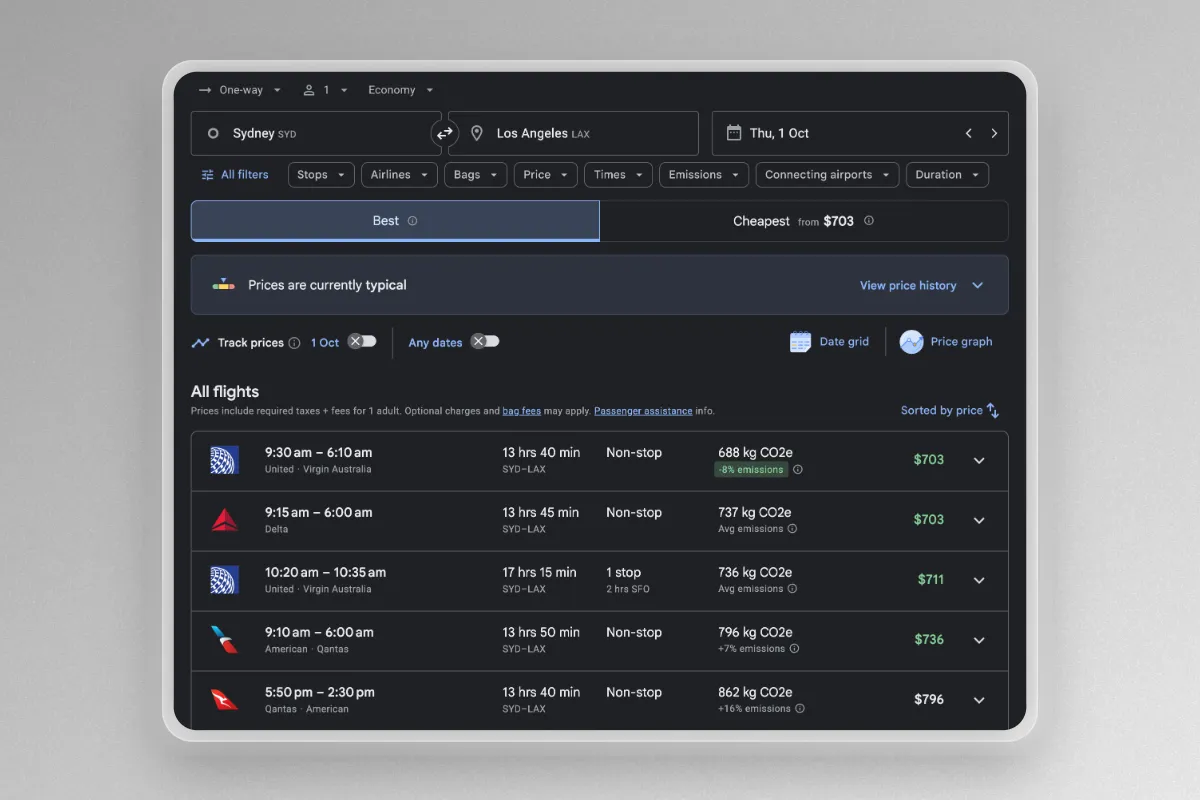
5. You can filter search results by number of stops, airlines, departure and arrival times, layover duration, connecting airports and more
6. You can change the sort order to best flights, price, departure time, arrival time and duration
7. To view the details of a flight, click on the arrow next to the price
Finding The Cheapest Dates On Google Flights
If you are flexible with dates, you can use the calendar view, date grid and price graph options to view the cheapest flights by date.
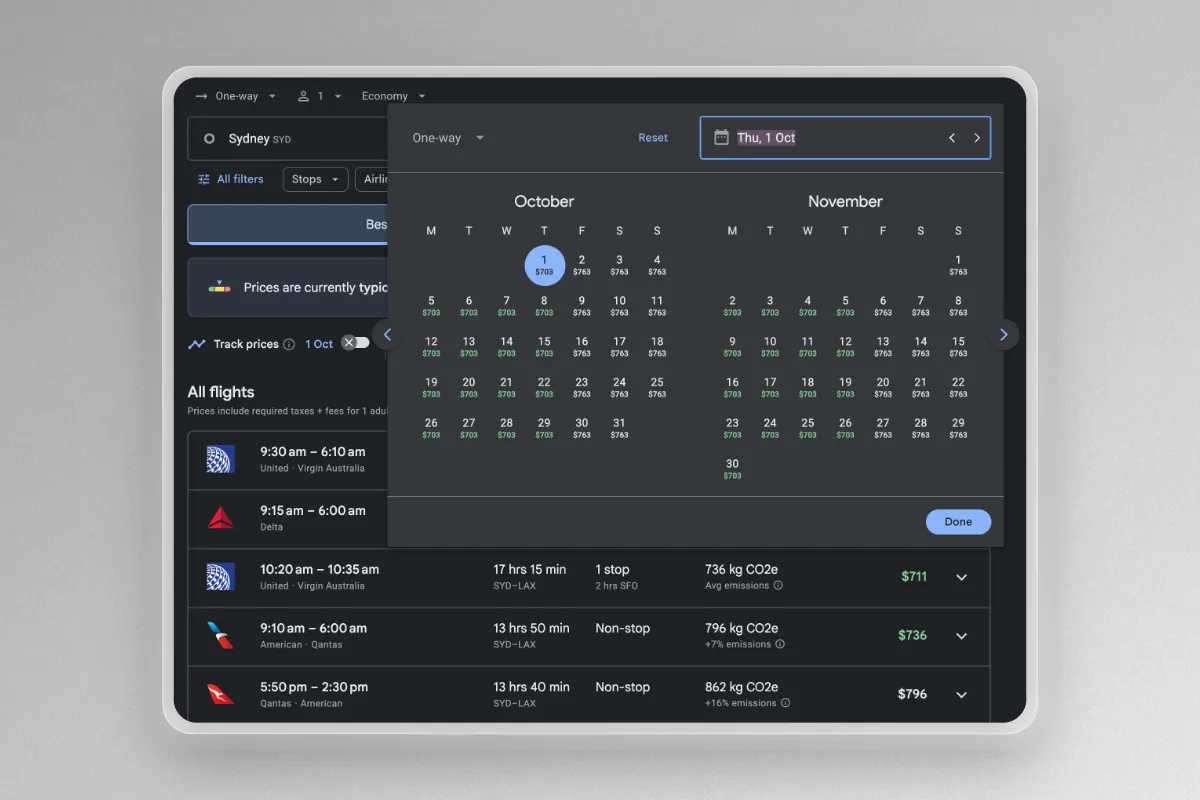
Calendar View
By simply clicking on the departure date, Google Flights will bring up a two-month calendar showing the cheapest flights for each day over that period. If you have selected a return ticket type, the prices shown assume that the trip length remains the same.
Grid View
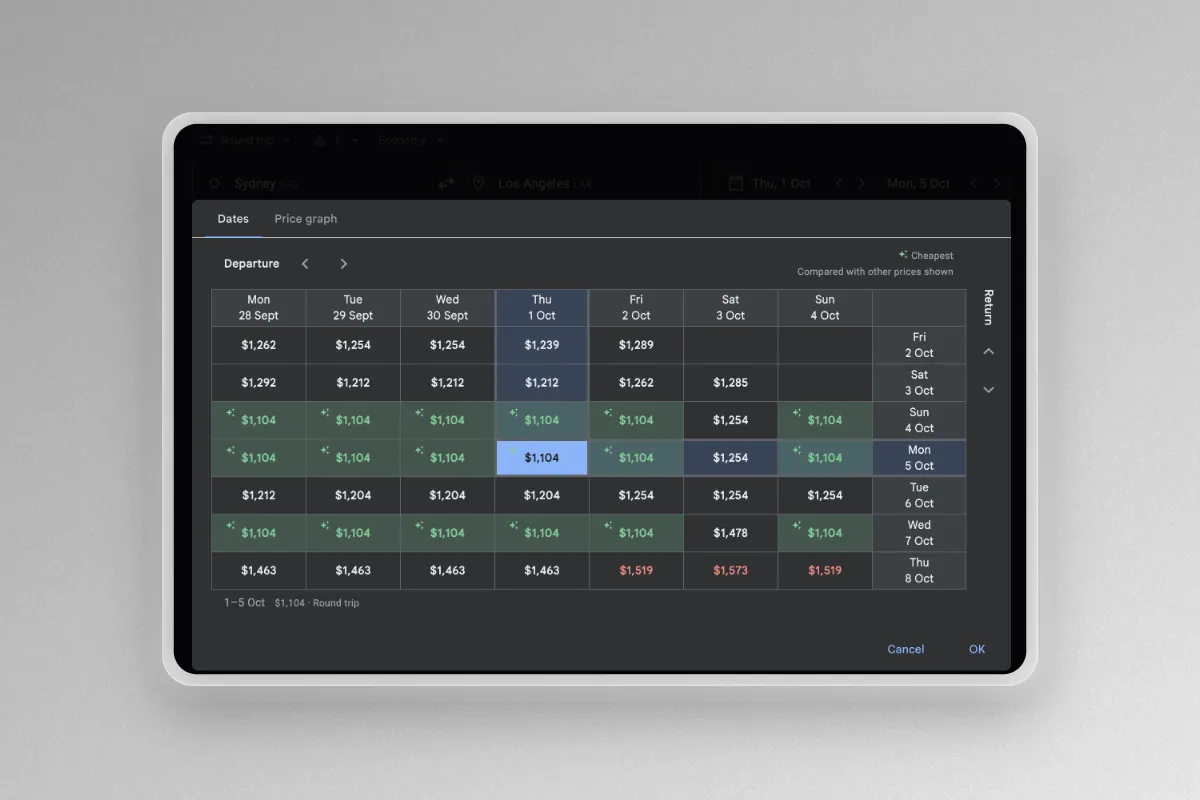
You can also click on "Date grid" to view the same information in a different layout. The grid view compares ticket prices on different days of the same week and is particularly useful for return trips, as you can quickly see how changing either your departure or return date affects the total fare.
This makes it easy to identify the cheapest combination of travel dates without manually running multiple searches.
Price Graph
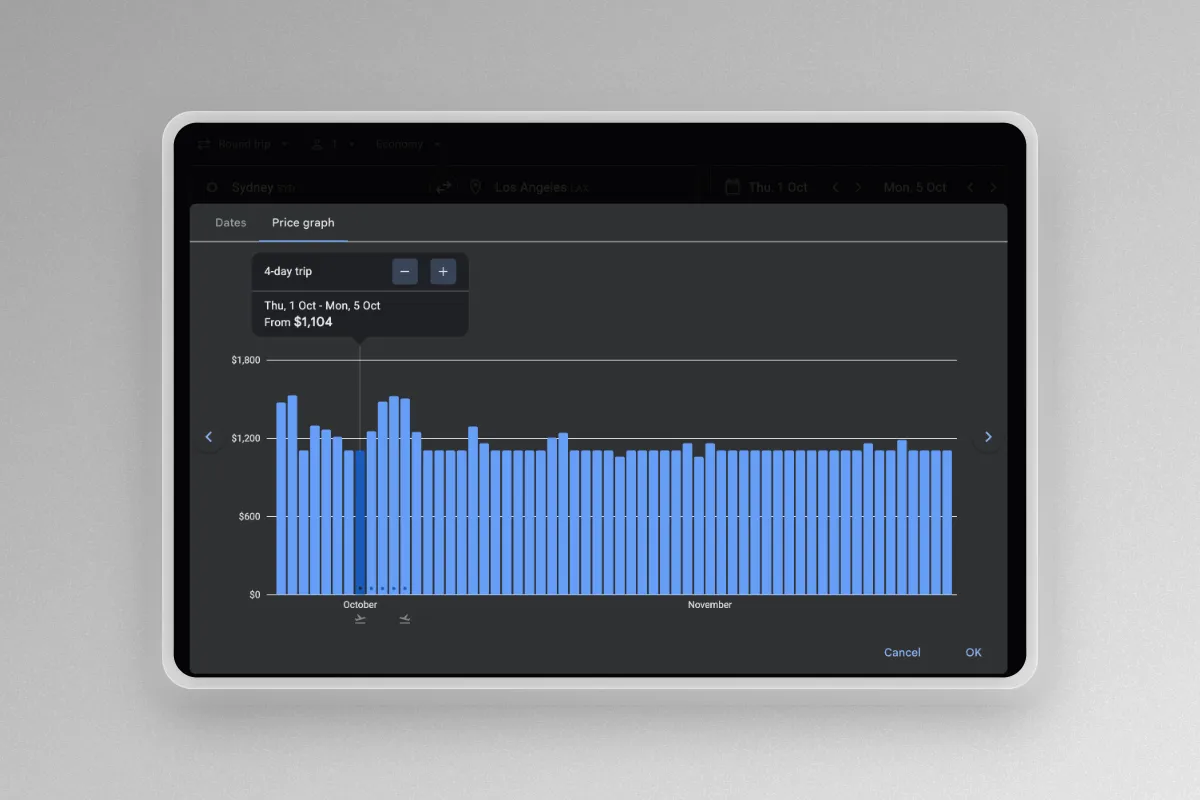
Another option is the "Price graph" function, which lets you visualise how airfares change across different travel dates and trip lengths. As you move along the graph, Google Flights displays the total fare for different date combinations, making it easy to identify cheaper travel periods.
Finding The Cheapest Airport
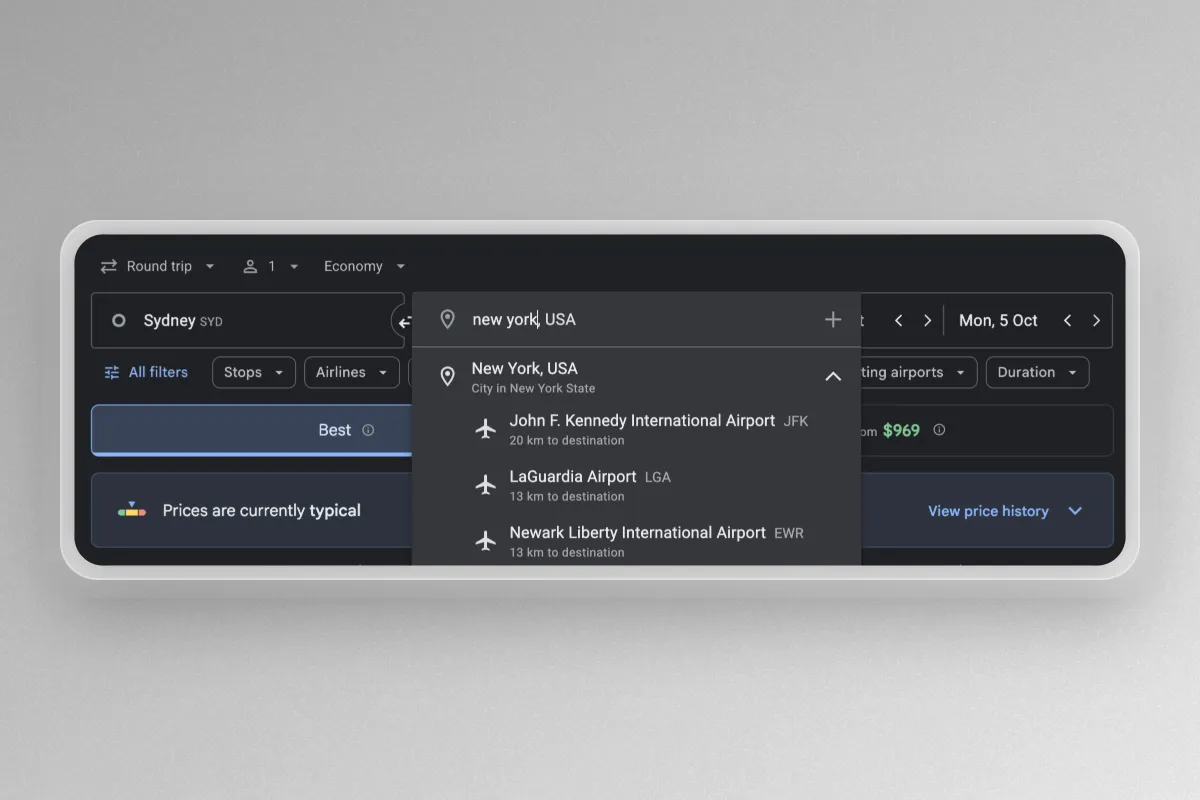
Google Flights allows you to search multiple airports at once, making it easy to compare fares and identify the cheapest airport to fly to or from. This is particularly useful when travelling to destinations with multiple airports, such as New York, London or Tokyo.
To search multiple airports, you can either enter a city name, such as New York, which automatically includes nearby airports like Kennedy (JFK), LaGuardia (LGA) and Newark (EWR). You can also manually enter multiple airports, cities or regions in a single search. For example, you could search Singapore and Bangkok simultaneously to compare fares, or even enter broader destinations such as Europe to see the cheapest available flight options across an entire region.
Tracking Prices With Google Flights
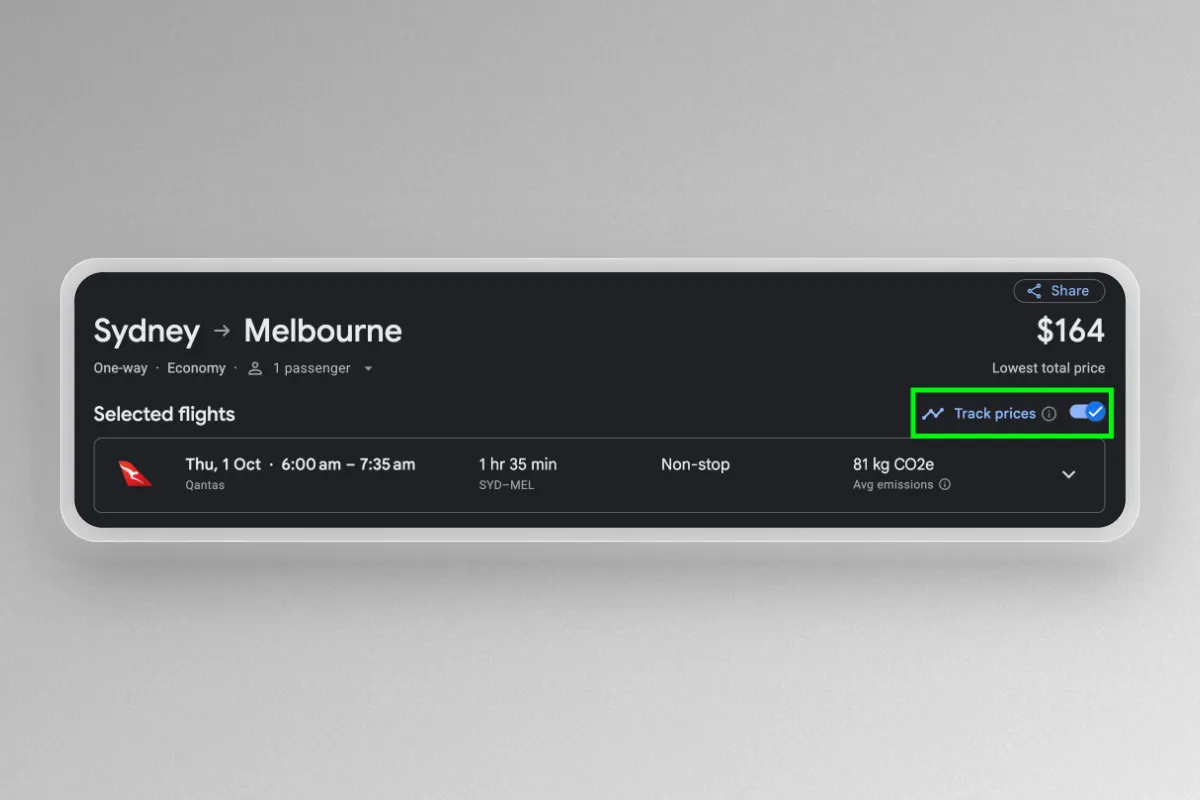
Tracking prices can be really useful and save you a lot of time compared to manually checking back each day. Once price tracking is set up, you will receive notifications when the price changes. You must be signed in to your Google account to track flight prices on Google Flights.
- Option 1: To track the lowest price for a trip, click the track prices switch on the flight result page. This will track any airline and any time for the route and dates you searched.
- Option 2: To track prices for a specific itinerary, click the track prices switch after selecting all flights. This will track the exact flights you selected.
After you have set up price tracking, you can view your tracked prices in Google Flights. Simply click on the hamburger menu (the three stacked bars) in the top left corner of the window, then select “Tracked flight prices”. From here you can delete alerts, turn off email notifications and view price history.
Google Flights Map
One desktop feature that is easy to miss is the map view, which shows the cheapest flights across a region. To bring up the map view, simply enter your departure city and dates, leaving the destination blank and click search. You should then get a map view something like this:
Using the map, you can zoom in and out to see more fares. You also enter entire countries or continents as the destination, rather than specific airports.
Although the initial map view only shows fares for the dates you entered, you can also find the cheapest flights at any time by clicking the dates selecting the “Flexible dates” option. For example, try Sydney to "Europe" as your destination to see all the possible flights and prices to the continent for your specified dates!

American Express Platinum Card
Offer ends 3 Nov 2026
Sign-up bonus Up to
300,000
bonus Membership Rewards points
- Earn rate Up to
- 2.25 pts / $1
- Our rating
Can I Book Flights Directly With Google Flights?
Something to remember is that Google Flights does not actually handle bookings, but redirects to sites that do. After selecting the flights you want to book, Google Flights will show you options through which you can book your flight.
Why Do Prices Jump On Google Flights?
Occasionally, a cheap fare shown on Google Flights will jump in price, either during your search or after selecting flights. This increase is often due to the price changing with one of Google’s booking partners, and sometimes there is no way to get the original price back. However, one thing to try is searching directly with some OTA’s like Aunt Betty or Webjet, and even directly with the airline.
Summing Up: My Take
Google Flights is one of the best tools for finding cheap flights and comparing all possible flight routes in one place. Apart from Flight Hacks, I can pretty confidently say it is my most visited website!
Its flexible date searches, price tracking alerts and explore tool make it incredibly easy to find better fares and uncover destinations you might not have otherwise considered.


Qantas American Express Ultimate
Offer ends 17 Nov 2026
Sign-up bonus Up to
120,000
bonus Qantas Points
- Earn rate Up to
- 2.25 pts / $1
- Our rating
Qantas American Express Ultimate
Offer ends 17 Nov 2026
Sign-up bonus Up to
120,000
bonus Qantas Points
- Earn rate Up to
- 2.25 pts / $1
- Our rating
Related posts